
Subcourses and metalinks between courses

Article sections
- With a subcourse activity, you can import the overall grade of one course into another course. A course must always be assigned to a subcourse activity.
- With a subcourse activity, you can import the subcourse completion condition to follow the main course completions. In this case, you can define the subcourse completion condition as the completion of one subcourse activity.
- With a meta link, you can “invite” students from one course to become members of another course. A meta link must be made in the opposite direction with the subcourse activity so that students have access to the course.
- For example, the Medicine Calculations course invites students from multiple parallel groups within the course or module.
Subcourse activity settings
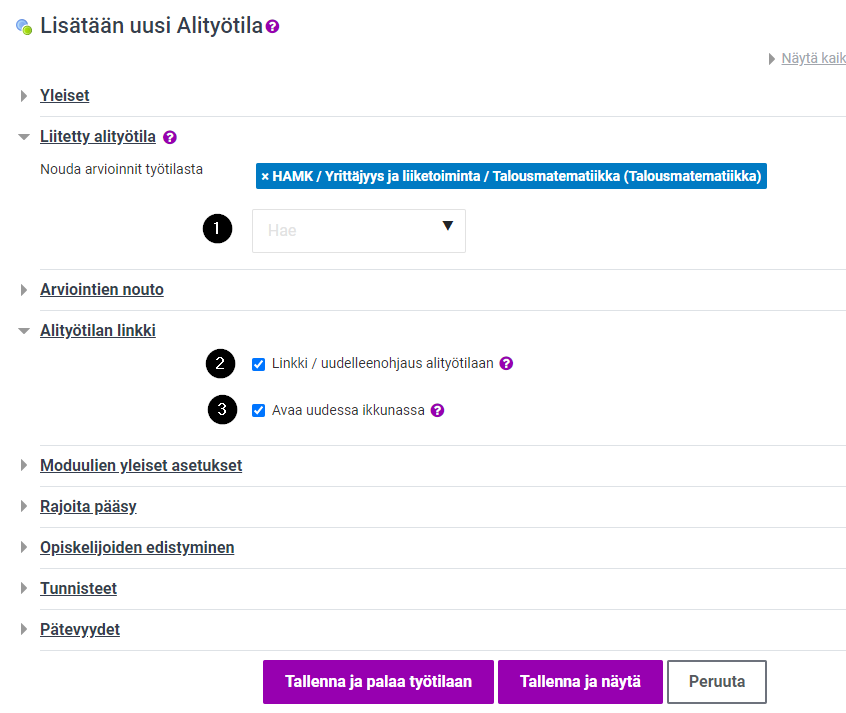
- Subcourse activity fetches the final grade from another Moodle course.
- You must always choose the Moodle course to be linked.
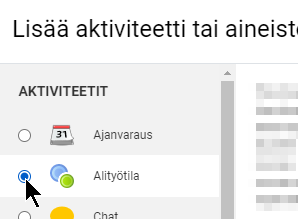
How to add a subcourse activity and define settings
Adding a meta link
- Go to the subcourse.
- Participants: from the Enrolment methods menu.
- At the bottom of the page, Add Enrolment Method, from the menu Course metalink
- Search for a course name, and choose the right course from the results list.
Add to a group: Create a new group. - Create the enrolment method.
