
Video planning and scriptwriting at HAMK
Article sections
A quality video production starts with planning. A script helps structure the video’s objective, content, structure, and method of implementation before filming or recording. It saves time in the later stages of production because filming, editing, and publishing proceed more smoothly when the content has been planned in advance.
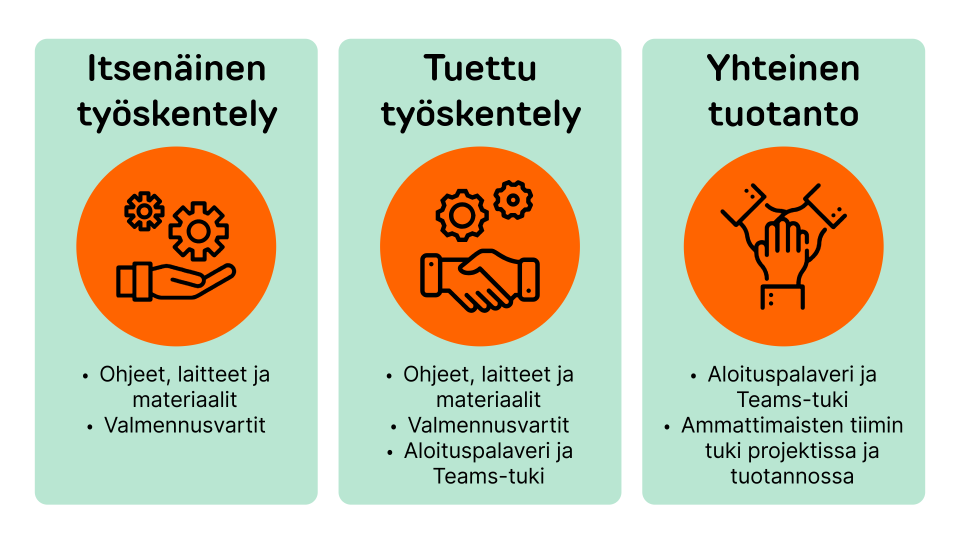
In HAMK’s Professional Productions service model (Intra, login required), the role of the script becomes especially important when the production is carried out with supported project or as a collaborative production together with specialists.
Explore the script example and download your own script template (Word): Script templates (Intra, login required)
Watch a video example showing what a script and a commercial film look like side by side: Oppimateriaali – mainoselokuvan ja käsikirjoituksen vertailu (Kaltura, login required. Duration 5:17)
Start with the video idea and objective
Before writing the actual script, make sure that the purpose of the video is clear. Think about what the video is meant to do, who it is made for, and how it relates to teaching or other use. Respect the viewer’s time: it is better to cover one clearly defined topic properly and interestingly than many topics in a general and scattered way. Before starting the scriptwriting process, consider whether another form of audiovisual content production might serve your idea better, such as Podcast – Podcast production at HAMK. Also remember to consider accessibility already at the video planning stage: Accessibility – Practical tips for accessible video captioning.
During the ideation phase, you can consider questions such as the following:
Content and purpose of the video
- Who is the video intended for?
- What is the most important objective of the video?
- What do I want the viewer to understand, know how to do, or remember after watching the video?
- In what situation and at what stage of their studies will the viewer use the video?
- Is the video primarily an instruction, an orientation to the topic, an illustration, an explanation, motivation, or revision?
- What is the one core message this video will focus on?
- Could part of the content be clearer as text, an image, an infographic, a podcast, or another type of material instead of a video?
Format and implementation
- What should be shown in the video, and what is enough to explain through speech or text?
- Does the video need the teacher’s face, screen recording, slides, objects, an environment, or other illustrative material?
- How long should the video be so that it is easy for the viewer to follow?
- Will the video most likely be watched on a computer or a mobile device?
- How do I ensure that the video is accessible and easy to follow also without sound?
Create a synopsis based on the idea
A synopsis is a short summary of the content of the future video. It briefly answers the questions what, for whom, why, and how. A synopsis is not a script, but a short summary of the video’s core idea, objective, narrative style, and implementation. It helps narrow down the idea before moving on to more detailed planning.
A synopsis helps you to:
- justify the production of the video, including the target audience and the benefit viewers will get from the video
- understand whether video is the right content production format for your idea
- formulate the common thread to follow during the scriptwriting phase and throughout the production
- explain the main content, target audience, and implementation method of your video to the Professional Productions specialists
Develop the synopsis into a script
The script forms the framework of the video. If you are working independently and the video is simple in terms of implementation, a list of the video’s scenes (the scene changes when the location or time changes, or when the video moves from one topic to another) and a description of their content is often enough as a script. The most important thing is that the video content is structured into parts that can be implemented, and that the audiovisual elements included in the video are decided in advance. These may include video shots, screen recordings, audio recordings or audio files, photographs, graphics, texts, voiceovers, music, and animations.
If the video is more complex in terms of implementation and/or you are producing it in cooperation with the Professional Productions support team, the script should be formatted as a two-column script using a ready-made script template or your own template.
The script should describe at least:
- the scenes, or main parts, of the video in the correct order
- what happens in each scene, meaning the action
- what is said or explained in the video while things happen on screen
- who appears or speaks
- what materials will be filmed separately and where existing material will be used
Create a storyboard when needed
A storyboard is a visual plan for a video, animation, or other audiovisual content. It presents as a sequence of images what the viewer will see at different points in the video: for example, camera angles, people, action, texts, graphics, and important transitions.
A storyboard helps the production team understand the whole video before filming or implementation. It can be used to make sure that everyone understands what happens in the shots, in what order things are presented, and what kind of material is needed for the production.
In the production of educational materials, a storyboard is rarely needed and can often be replaced by a two-column script or an attached shot list in which the visual content is explained in detail.
A storyboard is worth creating when the filming situations are complex or include several things that must work correctly:
- The video includes dramatic or staged scenes
- If the video includes actors, staged situations, interaction, demonstrations, or several camera angles, a storyboard helps the production team understand what happens in each shot.
- Example: a healthcare simulation, customer service situation, or hazardous situation in safety training.
- Visual storytelling is critical for learning
- If the learner needs to see exactly in what order things happen, what the hands are doing, where attention should be focused, or how a process progresses, a storyboard can prevent misunderstandings.
- Example: laboratory work phases, using a machine, technical installation, or a first-aid situation.
- The video combines video footage, animation, graphics, and text
- When several things happen on screen at the same time, a storyboard helps time the speech, graphics, highlights, on-screen text, and images.
- Example: an explainer video with voiceover, icon graphics, diagrams, and animations.
- The video includes specific camera solutions
- If precise camera angles, movements, close-ups, point-of-view shots, split-screen views, or before-and-after structures are needed, a storyboard makes them visible before filming.
A storyboard does not need to be drawn from scratch. For example, you can take photos with your phone to demonstrate the correct camera angle or a detail that needs to be visible in the shot. If needed, the photos can be turned into simple illustrations with the help of AI tools such as Nano Banana (Google Gemini) or DALL-E (OpenAI).
What does a script mean in the Professional Productions service model?
In HAMK’s Professional Productions service model, support is adapted to the need. This means that the level of detail required in the script also depends on whether you are producing the video yourself or together with specialists.
Independent project
In independent work, a light synopsis and a simple scene list with bullet-point descriptions of the scene content are often enough. The goal is that you can produce the video independently and that you are responsible for turning the content into a functional video.
Write down the following:
- the objective of the video
- the main points of the structure or spoken sections
- the materials needed
- what you will film yourself
Supported project
In supported project the script serves as a shared basis for discussion. Specialists help especially in the planning phase and in the use of software, but the implementation is mainly your responsibility. The script must be detailed enough so that the project can be discussed clearly in the Professional Productions kick-off meeting in Teams and during production in the AV projects Teams subchannel.
For supported work, it is good to prepare:
- a synopsis
- a script or detailed content outline
- an estimate of the implementation method
- information about what kind of support you need
- a preliminary schedule
Collaborative production
In a collaborative production, the script is a central guide for the production team. These are broad and demanding productions that require multidisciplinary expertise and close cooperation. In this case, the client must have a sufficiently complete description of what is being produced so that the production team can plan the work, resources, and schedule.
For a collaborative production, the client should prepare:
- a clear script or content outline
- information about the video’s objective and target audience
- an estimate of the required filming locations, participants, and materials
- preliminary filming schedules
- information about who approves the script, the edited draft versions of the video, and the final video
What should be agreed on with the team in advance?
If the video project is carried out through Professional Video Productions as a supported project or collaborative production, the following matters should be agreed on in connection with the script as early as possible:
- what the objective of the video is and who it is made for
- what the final scope of the video is
- what material the client will provide themselves
- what needs to be filmed or produced separately
- when the script will be approved
- when filming will take place
- who will comment on draft versions
- how many rounds of comments will be carried out
- who will approve the final version
